
NVIDIA's Nemotron 3.5 Transcribe: one open model for meeting transcripts, speaker labels, and translation
NVIDIA's new open-weight speech model transcribes 40 languages and labels up to eight speakers — but the compact local builds are still coming.
NVIDIA released Nemotron 3.5 Transcribe on October 28, 2026: one open-weight model that turns a recording into a transcript, labels who said what, translates it, or answers questions about it. It transcribes 40 languages, translates 31 of them to and from English, and attributes speakers in 13 languages. It handles recordings up to an hour long and labels up to eight speakers. The weights are released under the OpenMDW-1.1 license, which permits commercial use.
One model instead of four tools
Most transcription setups chain several pieces together: one tool to transcribe, another to split speakers, a third to translate, and a fourth to search the result. Transcribe folds those jobs into a single checkpoint, and you steer it with a plain-language prompt. The same recording can produce different outputs depending on what you ask for:
- "Transcribe this recording and label each speaker."
- "Translate this audio into English."
- "What decisions were made in this meeting?"
You can also give it context up front, such as product names or medical terms, and tell it to use those spellings only when the audio supports them. Word-level timestamps are supported, so a transcript can be shown alongside a replay of the recording. One limit matters for planning: this is a model for recorded audio, not live streaming. If you need captions as someone speaks, this is not the tool for that job.
Under the hood it is a 30-billion-parameter mixture-of-experts model, but only about 4 billion parameters are active per token. That sparse design is why NVIDIA says it can run on a single chip, from a Jetson AGX Thor board and a DGX Spark desktop system up to Blackwell data-center GPUs. The honest timing note: the small-device path depends on quantized versions that NVIDIA says are still coming, along with a local NeMo-Speech.cpp deployment option. Today, the available checkpoint is served with vLLM or SGLang-Omni, which realistically means a strong GPU or a server, not an ordinary laptop. Hosted endpoints from Baseten, DeepInfra, and Simplismart exist if you want to try it before committing hardware.
The benchmark picture, honestly reported
NVIDIA's announcement leans on several leaderboards, and the numbers are worth separating into what they actually measure. Word error rate, or WER, counts transcription mistakes as a share of words: lower is better.
On the Hugging Face Open ASR Leaderboard for English, Transcribe ranks first among open-weight models at 5.33% average WER, with API models excluded from that ranking. Across seven languages it reports 4.62% mean WER, and on long-form audio 10.98%, both the lowest among the open-weight models in its comparison. Artificial Analysis, an independent evaluator, ties it for first among open-weight models at 2.8% AA-WER — with about 4 billion active parameters against about 24 billion for the model it ties. On speaker attribution, it posts the lowest diarization error rate, 18.26%, across 21 languages on David AI's benchmark of 14 systems, and ranks first on VoiceArena's 14-system comparison of full English sessions with overlapping speech.
Those are strong results, but two caveats apply. First, most of the headline numbers come from NVIDIA's own announcement and the leaderboards it cites, so treat them as a promising claim to test on your own recordings, not a settled verdict. Second, language support differs by task: audio question answering was trained in English, and speaker attribution covers 13 languages, not all 40. NVIDIA itself advises spot-checking names, speaker changes, and answers against the recording.
Prompt first, fine-tune second
The most useful part of this release may not be the model alone. It is the pairing with Granary v2, the open data-curation pipeline behind it. Granary v2's public manifest covers 463,062 hours of speech across 48 languages and 16 source corpora, up from 25 languages in version 1. Note what that manifest is: it describes the data and its quality labels, while the source audio itself must be downloaded separately under each corpus's original license.
NVIDIA's medical case study shows why the prompt-then-fine-tune order matters. On recordings from Indian doctors and medical students, a better prompt — one that simply named English and the Latin alphabet — cut word error rate on the full test set from 30.8% to 23.8%. Fine-tuning then brought it to 11.8%.
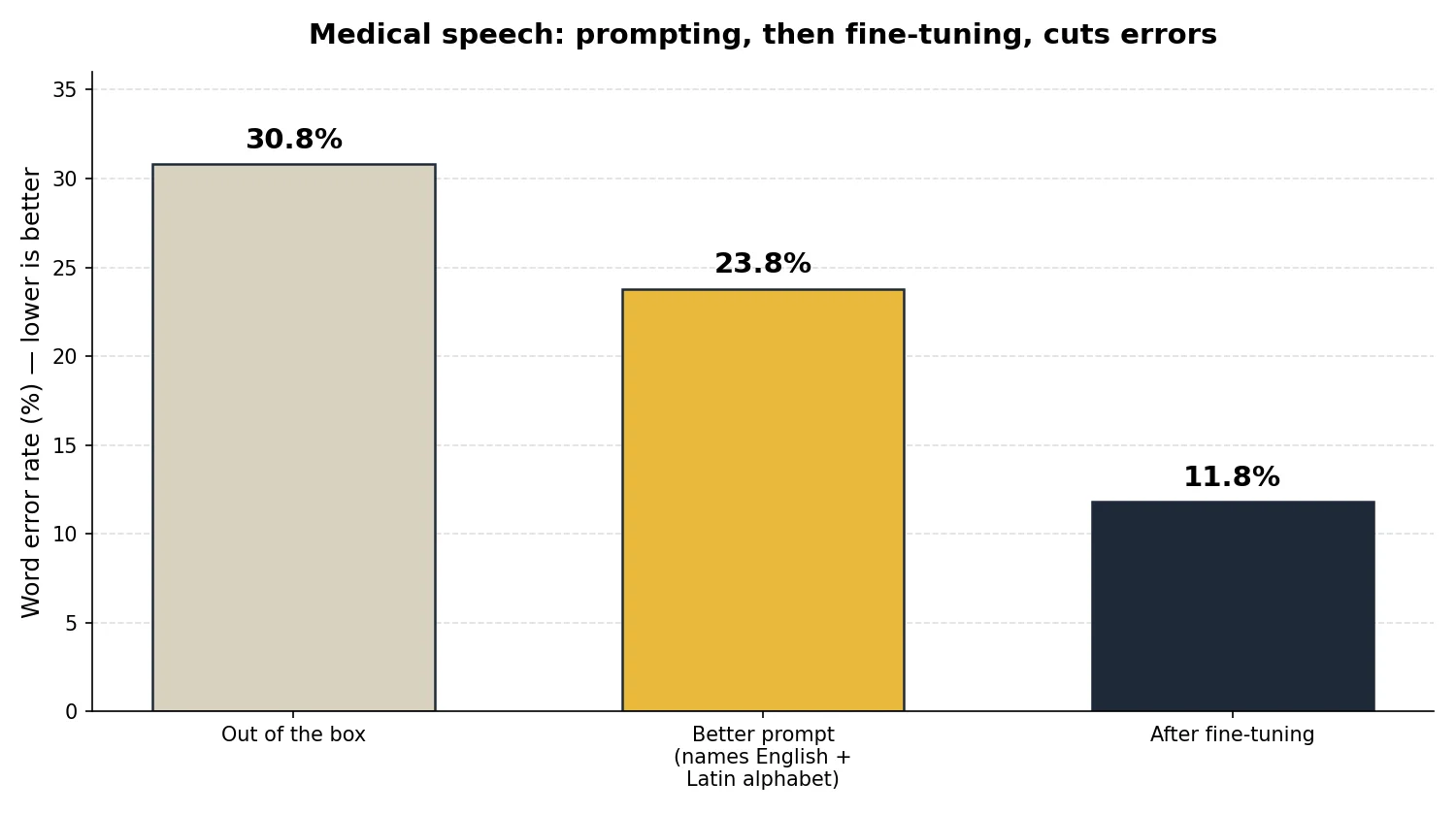
The cleaner held-out test, on speakers the fine-tuned model had not seen, tells the same story with less flattery: word error rate fell from 22.44% with the best prompt to 12.17% after fine-tuning, a 45.8% relative reduction. The full adaptation took about 14 GPU-hours on one GB300. That is the pattern worth copying: try a careful prompt first, and only pay for fine-tuning when the errors that remain are about your vocabulary, your accents, or your transcript format. For your own domain, NVIDIA's own advice is to keep at least 100 real, labeled clips for checkpoint selection, and to check that general speech does not get worse — in this study, general English error rose slightly, from 1.54% to 1.69%, after medical tuning.
Try it today
If you transcribe meetings, lectures, interviews, or support calls and the audio cannot leave your machine, this release is worth a test drive: start with the Hugging Face demo or a hosted endpoint, then try the checkpoint with vLLM on hardware you control. If you run a smaller setup, wait for the quantized versions and the NeMo-Speech.cpp route before judging what it costs to run at home. And if you are still deciding what hardware to run models on, start with /check to match a model to the machine you already own.
The bottom line
Nemotron 3.5 Transcribe does not change what transcription is. It changes how many tools you need for it: one open model for transcripts, speaker labels, translation, and questions about a recording, with a documented path from a better prompt to a fine-tuned model for your own vocabulary. The catch is timing. The full checkpoint is here today for server-class GPUs, while the compact local builds for smaller NVIDIA hardware are still coming. Test it on your own recordings, check the speakers and names yourself, and let the quantized release decide whether it earns a permanent place on your machine.
Sources
- NVIDIA Nemotron 3.5 Transcribe and Granary v2: Intelligent Multilingual Transcription You Can Prompt and Adapt, NVIDIA on Hugging Face, October 28, 2026
- Voice AI in vogue: Nvidia releases new open transcription model, TechCrunch, October 28, 2026
- NVIDIA Launches Open-Weight Speech Model and 463,062-Hour Audio Dataset, Unite.AI, October 28, 2026