
EmbeddingGemma 2: search your files by meaning, image, and sound
Google's 740M open model maps text, code, images, video and audio into one space and runs in 567 MB of RAM on a phone.
Most local AI tools answer questions. The part that finds the right file, photo, or clip first is often a separate, messier job. On October 6, 2026, Google DeepMind released EmbeddingGemma 2, a small open model built for that finding step. It does not write answers. It turns text, code, images, video, and audio into numbers a computer can compare, so you can search by meaning instead of by filename.
🎬 Prefer to watch? Here's the video version of this article.

What an embedding model actually does
Think of every file as a point on a map. Files with similar meaning sit close together. Files with different meaning sit far apart.
An embedding model builds that map. You feed it a sentence, a photo, or a short clip. It returns a list of 768 numbers, called a vector. A search tool stores those vectors, then compares a new query against them and returns the closest matches.
That is why embeddings matter for local work. If the map is built on your own machine, your files do not need to leave it for the search step. A chat model can then read only the few matches you found, instead of scanning everything.
One space for five kinds of input
The first EmbeddingGemma handled text. Version 2 expands the same shared space to code, images, video, and audio, according to Google.
That shared space is the practical point. A text query can match an image. A voice memo can help find a video clip. Hours of audio can be searched with typed words. You do not need a different search model for each file type.
The model is built on the Gemma 4 architecture and released under Apache 2.0. Google lists 740 million parameters in total. That total breaks down into a 270 million parameter text part, plus optional encoders of 170 million for vision and 300 million for audio.
Load only what you need. A notes app that searches text can run the smaller part. A photo or media app can add the other encoders.
The memory math is small
Size is where this release earns attention from local users.
With quantization, Google reports about 191 MB of active RAM for text-only weights on a Pixel 11 Pro, and about 567 MB for the full multimodal model on the same phone. Those are Google's own figures, not independent tests, and results on other hardware will differ.
Still, the order of magnitude matters. This is not a model that needs a gaming GPU. It is sized for phones, laptops, and small home servers.
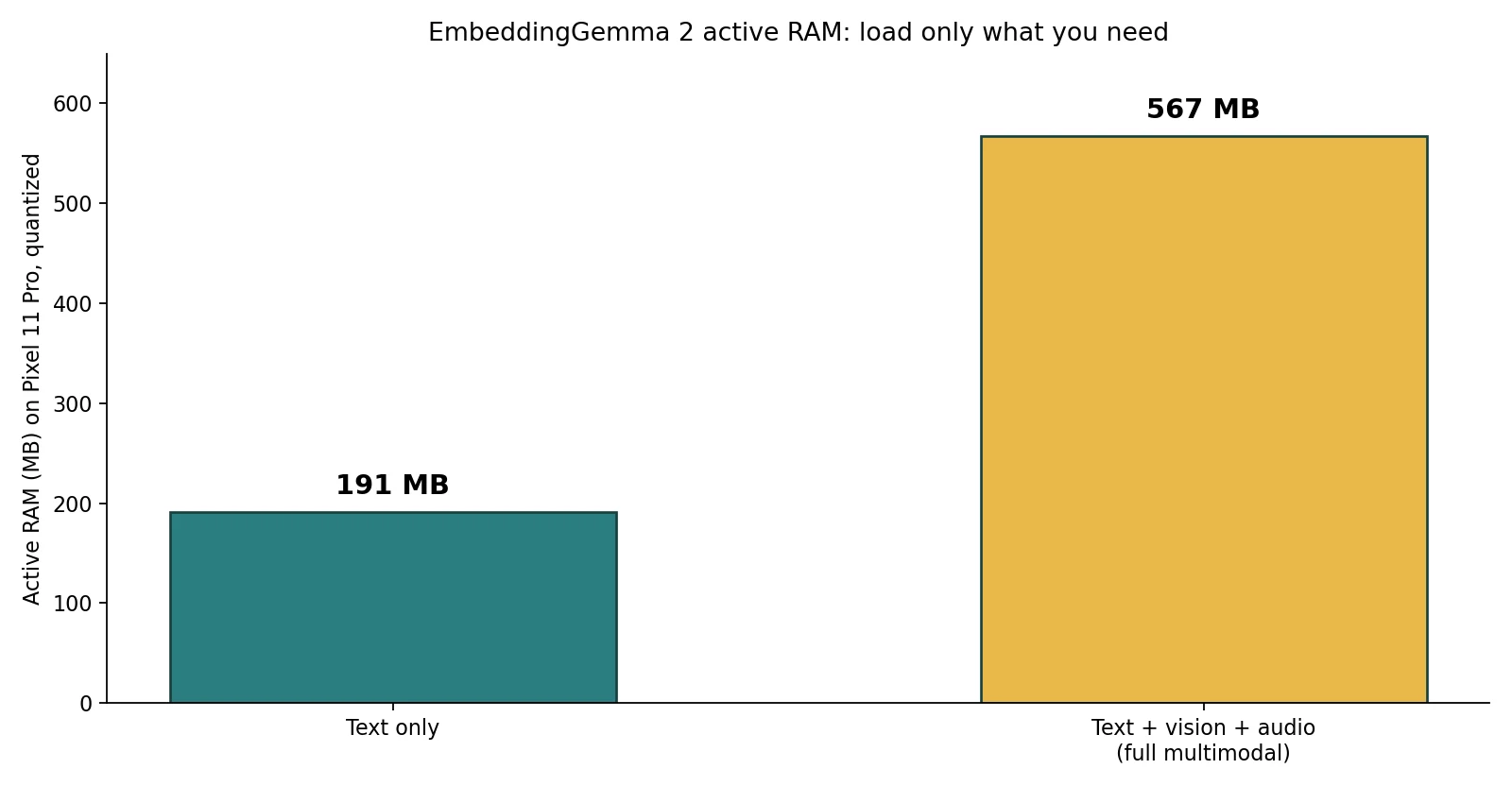
The Ollama library lists download sizes that match that picture: 378 MB for the 270M text build, 714 MB for the 440M build, 990 MB for the 570M build, and 1.3 GB for the 740M build. Check the exact build before you download, because names and sizes can change.
You can shrink the vectors, too
Storing a vector for every chunk of every file adds up. EmbeddingGemma 2 uses Matryoshka Representation Learning, which lets you shorten each output from 768 numbers down to 512, 256, or 128.
Google says that gives up to a 6x reduction in storage for local vector databases. Shorter vectors are faster to compare and cheaper to store. The trade-off is quality: Google's model information shows scores drop as you truncate, with the smallest 128 size best suited to text-only work. Start at 768 or 512 for mixed media, then test 256 on your own files before you commit.
Context and code results
The context window is 8K tokens, which Google describes as four times larger than the first version. In media terms, Google lists up to 5.5 minutes of audio, 29 images, or 58 video frames in one pass, or a mix of those inputs.
For code, Google reports a clear gain. Its MTEB Code score rose from 68.76 for the first version to 78.68 for version 2, a rise of 9.92 points. That makes local code search a sensible first test: index a project folder, then ask for the function that handles a task in plain words, and see whether the right file comes back first.
Those benchmark numbers are Google's. They show direction, not a guarantee for your files, your language, or your hardware.
How to try it locally
Google lists support in tools many readers already use, including Ollama, LM Studio, llama.cpp, MLX, vLLM, and sentence-transformers. Weights are on Hugging Face and Kaggle.
A simple first test needs no chat model at all:
- Pick a small folder you know well, such as 50 notes or photos.
- Run the text-only build if the folder is text, or the full build if it mixes media.
- Build the index once, then search with phrases you would actually say, not exact filenames.
- Check whether the top three results are the files you expected.
If that works, pair it with a small local chat model for retrieval-augmented generation, often shortened to RAG. The embedding model finds the passages. The chat model answers from those passages only. Our hardware check can help you see what chat models fit your machine alongside it.
Honest limits
This model does not answer questions on its own. It finds and ranks content. You still need an app, a vector store, and, for spoken or written answers, a separate generative model.
It is also new. Independent tests on real photo libraries, messy audio, and non-English files are still thin. Google's RAM and benchmark figures come from its own testing on its own phone. Treat them as a starting point, then measure on your device.
Finally, local search is private only if the whole pipeline stays local. If your app sends the retrieved text or images to a cloud chat model, that part is no longer on-device, even though the embedding step was.
The takeaway
EmbeddingGemma 2 changes what you can do on your own machine in a quiet, useful way: one small, open model can now index text, code, photos, video, and audio in the same searchable space, in well under 1 GB of active RAM on a phone-class device. Start with one folder, test real searches, and keep the pipeline local if privacy is the reason you are doing this.