
Speculative decoding: free speed for your local LLM
A software update can make your local models answer noticeably faster on the same hardware — here is how speculative decoding works, and where it helps most.
Your graphics card did not get faster this month. Your answers might have anyway.
Over the last few weeks, the software that runs local models got measurably quicker — not because anyone released a bigger model, but because the engines learned a trick called speculative decoding. If you use Ollama or LM Studio, there is a good chance a free speedup is sitting in an update you have not installed yet.
🎬 Prefer to watch? Here's the video version of this article.

What speculative decoding actually is
A normal language model writes one token at a time. Each step depends on the previous one, so the biggest cost is waiting: the GPU finishes one token, then starts the next. This is why generation feels slow even on a fast card.
Speculative decoding changes the order of work. A much smaller, faster "draft" model guesses several tokens ahead. Then the big model checks all the guesses at once, in a single pass. Guesses it accepts are kept; guesses it rejects are replaced. As NVIDIA described it in its September announcement, a smaller draft component proposes multiple tokens that the main model verifies together, "reducing the number of sequential generation steps when enough proposed tokens are accepted".
Think of it as an intern drafting a reply and a manager signing off on whole paragraphs at a time. Checking is far cheaper than writing from scratch — provided the draft is usually right.
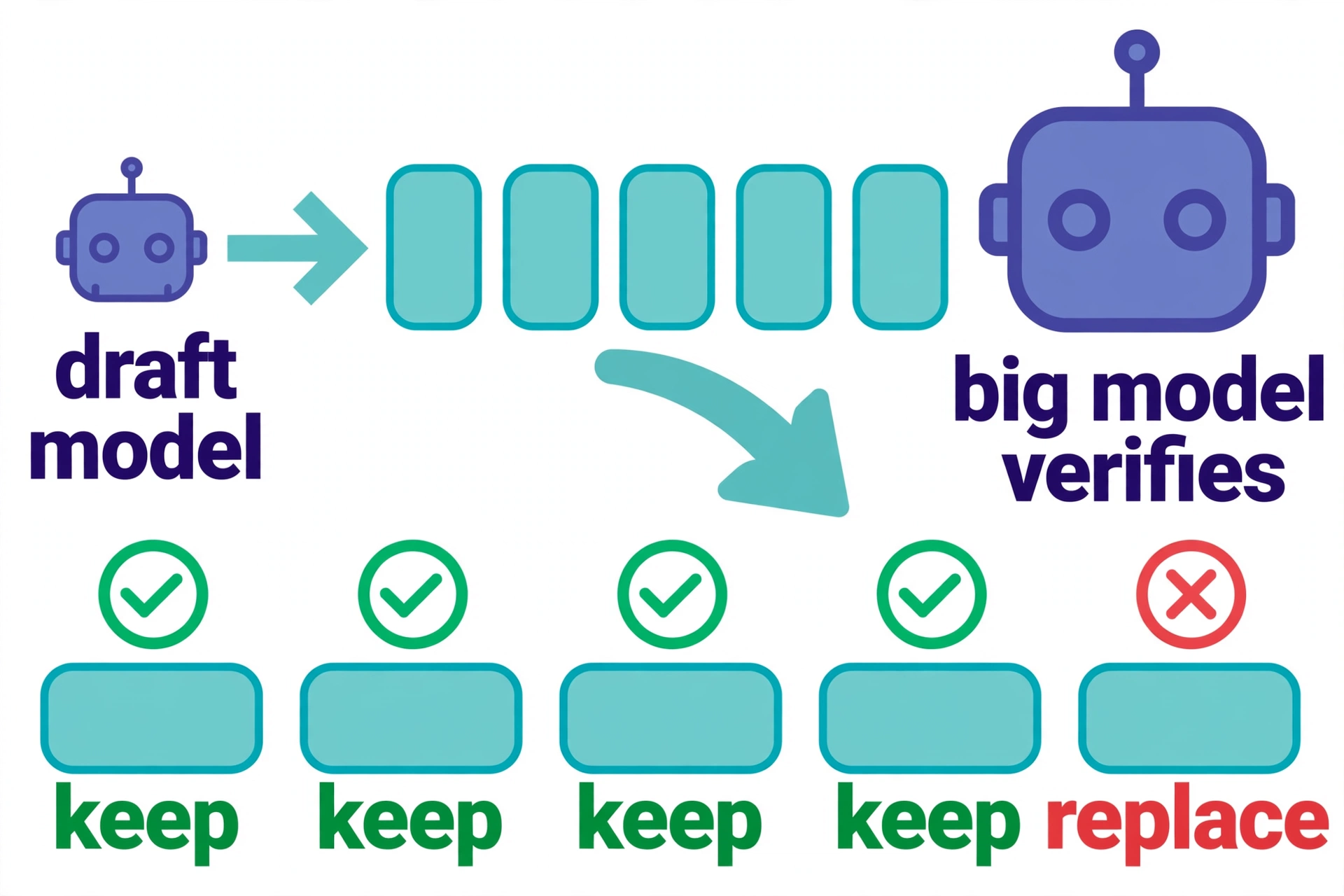
The number that decides everything is the acceptance rate: what share of the draft's guesses survive. When output is predictable — code, form letters, lists, answers that follow a pattern — acceptance is high and the speedup is large. When the output is open-ended and creative, the draft guesses wrong more often, each rejection costs a little, and the gains shrink.
It already landed on your machine
At IFA 2026, NVIDIA said new optimisation work makes local agents up to 1.9x faster on llama.cpp, attributing the gains to optimised kernels, improved speculative decoding, and faster prompt prefill. The important caveat: the headline 1.9x figure applies to one model, framework, and GPU combination; the remaining tests ranged from 1.2x to 1.5x. The consumer GPU in the benchmark was an RTX 5090.
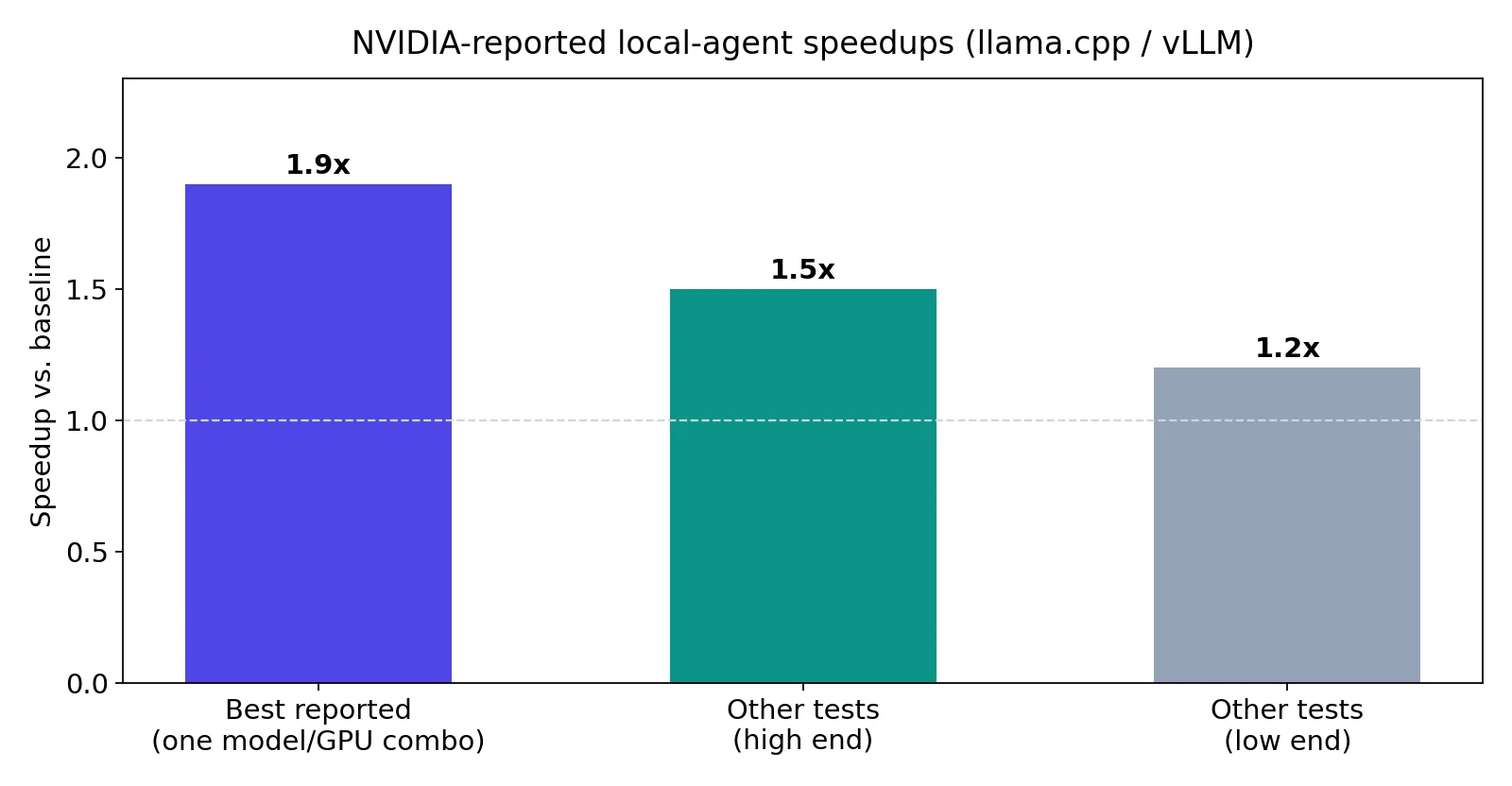
What matters for you is distribution. NVIDIA said the updates are available through the llama.cpp and vLLM backends — and through LM Studio and Ollama, the two apps most beginners actually use. Most people meet these optimisations as an app update, not as a compiled kernel.
Ollama's own release notes confirm speculative decoding is in the engine you may already run: version 0.34.2, released mid-September, fixed "excessive memory growth during long generations with MLX speculative decoding". And the pre-release v0.40.0-rc0 (25 September) made MLX the default engine on Apple Silicon, so Mac users get the faster path without opting in. Stable remains v0.35.0 as of this week — you do not need the release candidate to benefit.
Where you will feel it — and where you will not
Speculative decoding speeds up generation: the phase where the model writes its answer. That is the phase you stare at. It helps most with:
- Long answers, where dozens or hundreds of tokens are generated
- Predictable output: code, structured data, summaries of documents you provided
- Chatbots and agents that generate a lot of text per request
It helps least with:
- Very short answers — there is little to speed up
- Wildly creative or unpredictable writing, where the draft model's guesses keep missing
- The initial reading of your prompt (prefill), which is a different phase; NVIDIA's update improved that separately
The one takeaway
Before you assume you need a better GPU, check whether your app is current. Run ollama --version, or check LM Studio's update banner:
ollama --version
If you are several versions behind, the engine on your own machine may already be 20 to 50 percent faster than the one you installed months ago. That is the test this site exists to answer: does this change what you can do with AI on your own machine? For anyone generating long answers locally — yes, with zero new hardware and zero dollars.
You can put a number on your own setup with the site's speed test at /speed-test, and check what fits your machine at /check.
The honest limits
A speedup you cannot measure is a rumour. Vendor-reported numbers are the best available here, and NVIDIA's own reporting says the headline figure is one favourable combination. Your model, your prompt length, and your hardware decide your number. Creative writing gains less than the benchmarks suggest, because benchmark text is usually more predictable than a poem. And speculative decoding is a decode-phase trick: if your workload is "read a 100-page document and answer in one sentence", the win is small.
Also note the release-candidate caution: Ollama's v0.40.0-rc0 is a pre-release. The MLX-by-default change is the one to watch, but most people should stay on the current stable (v0.35.0) unless they have a reason to test the new default.
Sources
- Runtime Wire on NVIDIA's IFA 2026 announcement: new optimisations make local agents up to 1.9x faster on llama.cpp and vLLM
- Ollama release v0.34.2: "Fixed excessive memory growth during long generations with MLX speculative decoding"
- Intelligibberish, 2 October 2026: "What's New in Ollama 0.40, and Should You Upgrade?"