
MiniCPM-V 4.7: a 35B vision model that acts like a 3B on your hardware
OpenBMB's MiniCPM-V 4.7 is a 35B vision model with only 3B active per token, Apache 2.0, day-0 GGUF. The hardware math — and the claims still needing checks.
OpenBMB released MiniCPM-V 4.7 this week: a 35-billion-parameter vision model where only 3 billion parameters are awake for any single token. It is the first mixture-of-experts model in the MiniCPM-V series, it ships under Apache 2.0, and it comes with GGUF quants on day zero. That combination — big-model knowledge, small-model speed, permissive license, local-friendly files — is exactly what makes an open release worth a second look.
🎬 Prefer to watch? Here's the video version of this article.

What OpenBMB released
Two models landed on Hugging Face:
- MiniCPM-V-4.7-35B-A3B — 35.2 billion total parameters, about 3 billion active per token, with a 256K context window. Built on a Qwen3.5/Qwen3.6 language backbone with a SigLIP2 vision module.
- MiniCPM-V-4.7-1B — a 1.55-billion-parameter dense companion for modest hardware.
The release is Apache 2.0 licensed and ships with FP8, AWQ, GPTQ, and GGUF quants from day zero, plus what OpenBMB calls day-0 support for Rockchip, Houmo, Intel, AMD, and Arm chips, and iOS, Android, and HarmonyOS. A third party has already merged OpenVINO support into Hugging Face's optimum-intel library, including a custom int4 compression path for the 35B variant — a sign the ecosystem is moving fast.
The trick: 35 billion stored, 3 billion awake
In a mixture-of-experts model, the weights are split into "expert" sub-networks, and each token only wakes up a few of them. Think of it as a hospital: all the specialists are on staff, but your case only sees two or three. Storing everyone costs a lot; treating one patient does not.
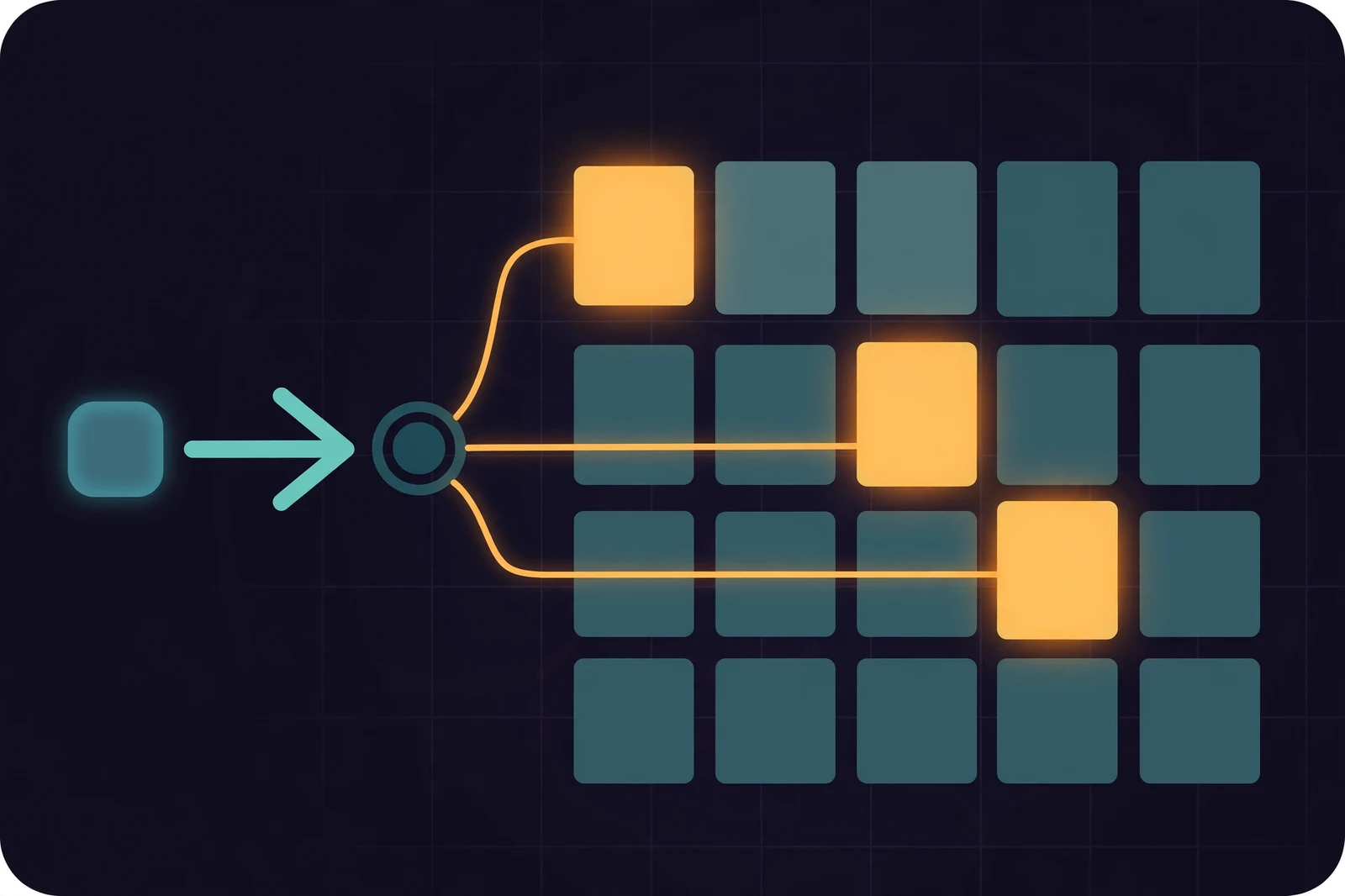
That is why decode speed follows the active number, not the total. A 35B-A3B model can generate tokens at roughly the pace of a 3B model — if you have somewhere to keep the full 35B. OpenBMB's efficiency stack for this is specific: Lookahead Expert Scheduling to preload the next layer's experts, fine-grained layer-wise quantization, a DSpark draft model for speculative decoding, and compressed visual tokens borrowed from LLaVA-UHD v4.
The hardware math
Here is the honest part — the chart of what you store versus what runs:
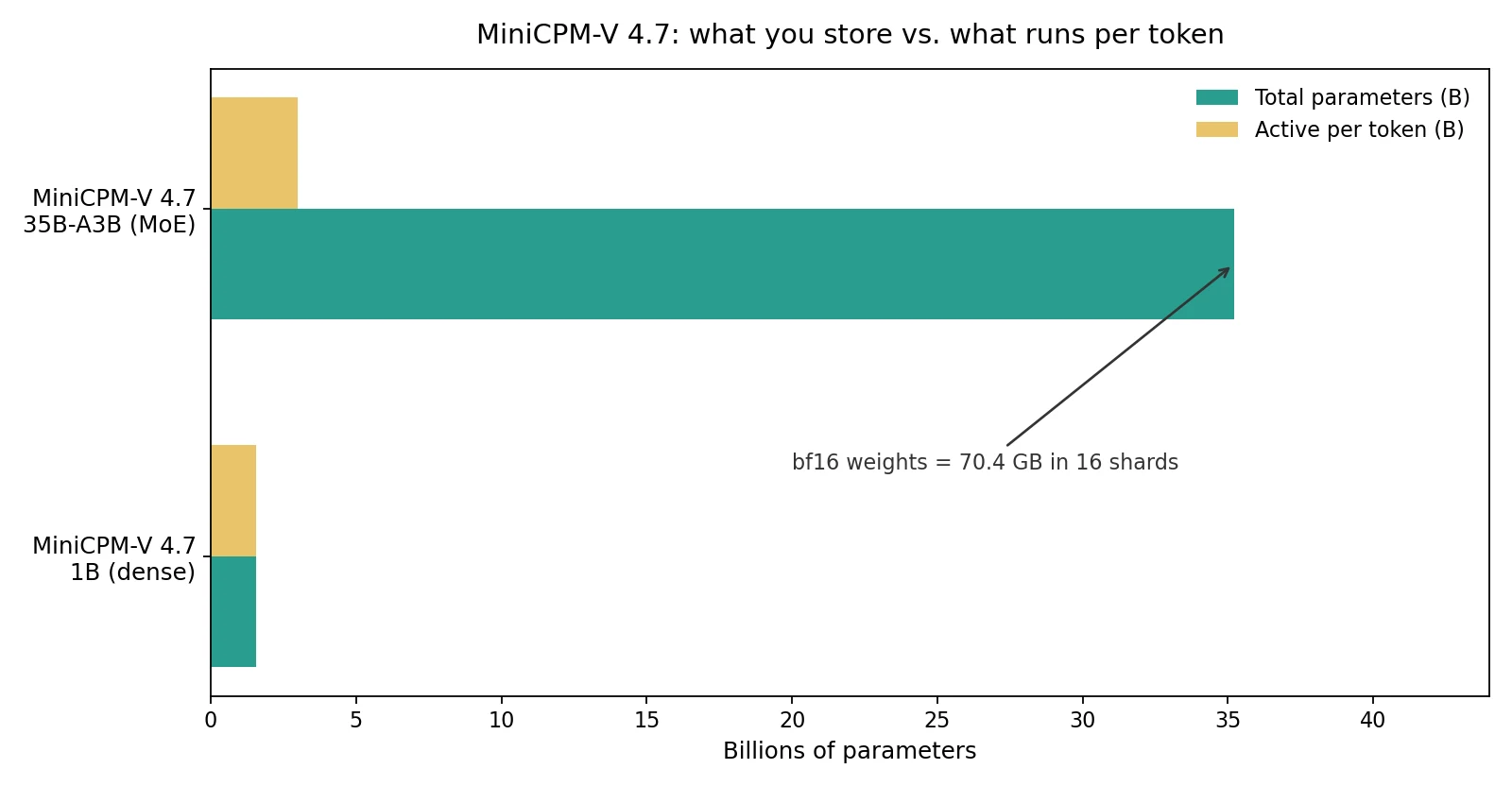
The raw bf16 weights are 70.4 GB across 16 shards. That is data-center territory if you try to load it untouched. The GGUF quants are the version that matters for home machines, and the file size of the quant you choose is the number that decides what fits your GPU. OpenBMB has not published the headline GGUF sizes on the release page, so check the actual file sizes on the Hugging Face repo before planning a download — do not assume a 35B MoE fits a 24 GB card until the quant numbers say so.
The 1B variant is a different story. At 1.55 billion parameters, its GGUF file is laptop-sized and it runs on CPU or integrated graphics — independent testers have already installed it through both Ollama and llama.cpp.
What the vendor claims — and what nobody has verified
OpenBMB says the 35B Instruct variant scores higher than Qwen3.6 35B-A3B at lower inference time, and that the 1B variant substantially outperforms Qwen3.5 0.8B. The eye-catching claim is from the model collection page: 13+ tokens per second with just 3 GB of memory on an iPhone 17 Pro Max.
Read those as OpenBMB's own numbers, not facts. Neither model card publishes benchmark tables underneath the claims. The phone figure comes from OpenBMB's custom runtime stack, not from llama.cpp or Ollama — your mileage on standard local tooling will differ. And the release itself was lumpy: the 35B weights appeared on Hugging Face on October 6–7 with no model card, no README, and no declared license; the documentation caught up later.
What changes for your machine
If the claims hold up, the practical payoff is private vision AI. A model that can look at your photos, read a handwritten note, or summarize a document — without any of it leaving your machine. Vision models are where cloud dependency feels most annoying, because the inputs are your personal files.
Two tiers, two audiences:
- On modest hardware: the 1B variant is the one to try first. Image description and basic document reading on a laptop or even a phone-class device, with the Apache 2.0 license clearing the way for whatever you build.
- On a serious machine: the 35B-A3B is the interesting one. If you have the memory to hold the weights, per-token cost lands near a 3B model's — that is 35B-class vision quality at small-model speed, locally.
Do not rebuild your setup around the 35B yet. Wait for the GGUF sizes, wait for independent benchmark numbers, and run your current machine through /check to see what already runs well today. MiniCPM-V 4.7 is one to watch closely, not one to plan around.
Sources
- Model pages: MiniCPM-V-4.7-35B-A3B and MiniCPM-V-4.7-1B on Hugging Face (OpenBMB)
- Release roundup with the iPhone efficiency claim: OpenBMB releases MiniCPM-V 4.7, series' first MoE model (AI Weekly, October 14, 2026)
- Shard sizes, 256K context, and the license-less launch: MiniCPM-V 4.7: A 35B-A3B Upload With No Card or Licence (OrcaRouter)
- Parameter counts and Apache 2.0 license entries: hf-model-watcher weekly catalog (GitHub)
- OpenVINO support PR for MiniCPM-V 4.7 (huggingface/optimum-intel)
- Third-party local tests: MiniCPM-V 4.7 35B-A3B Tested Locally and MiniCPM-V 4.7 1B: Install with Ollama and llama.cpp (YouTube)