
Best local AI models for 16 GB of RAM
16 GB is the most common machine on desks today. Here is which open models actually fit in it, with real file sizes and honest picks.
Sixteen gigabytes of RAM is the most common machine people own — the base MacBook Air, the typical mid-range Windows laptop, the work laptop your employer issued. So it is the question this blog should have answered first: what AI can you actually run on one?
The short answer is good news. You can run genuinely useful open models — fast chat, solid coding help, decent reasoning — entirely on your own machine. You cannot run a 70B model. The honest line sits in between, and it is drawn by real file sizes, not marketing.

The 12 GB rule
A 16 GB machine never has 16 GB free for a model. The operating system takes 2–4 GB, and the model's conversation memory — the KV cache — takes more the longer your chats get. Plan on about 12 GB actually usable for model weights.
Then use the rule of thumb from this blog's earlier memory math: a model needs roughly half a byte of memory per parameter at 4-bit quantization (call it 0.55 bytes per parameter for a safe estimate). That is weights alone; longer contexts add the cache on top.
The chart below uses real 4-bit download sizes from this morning's model-catalog check, verified against Hugging Face:
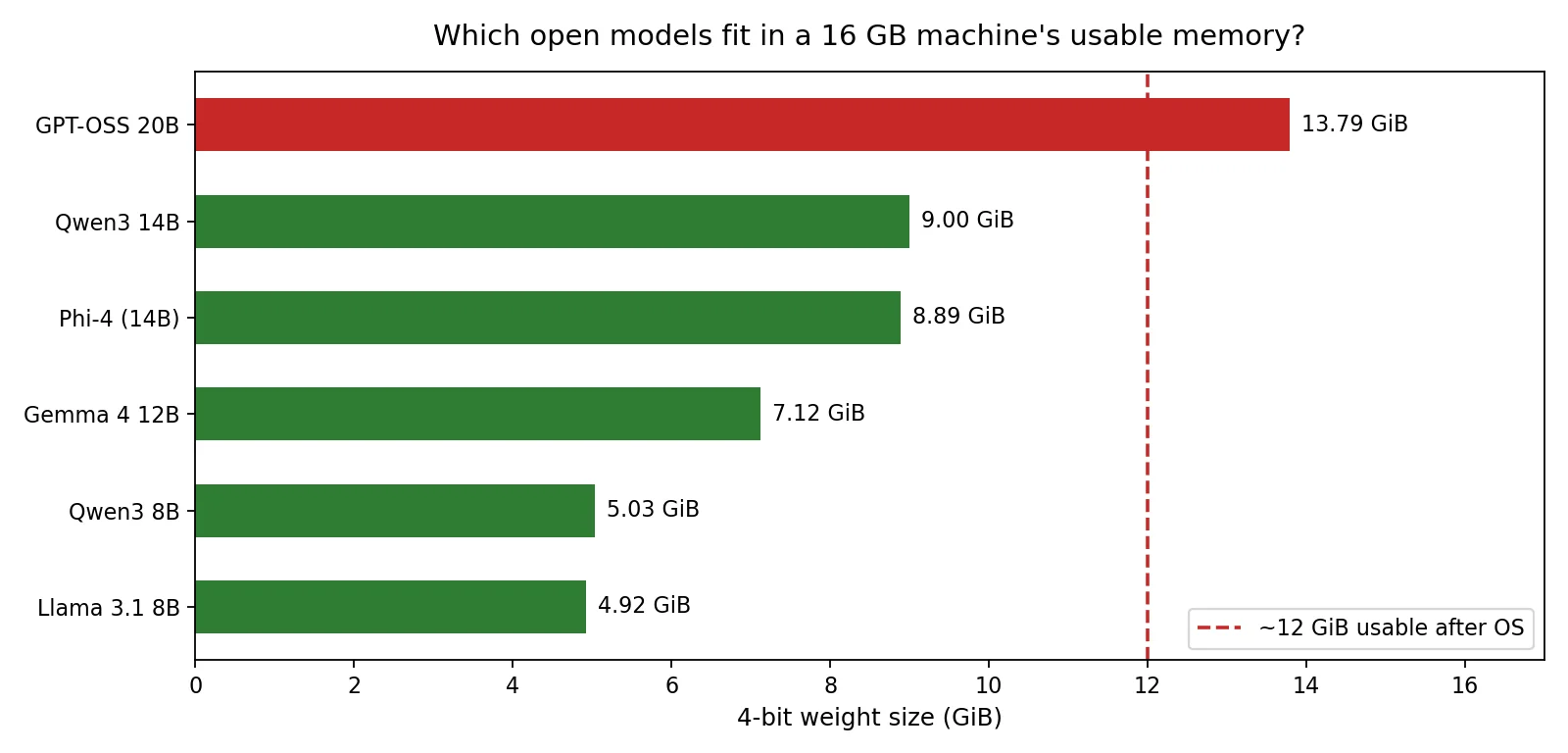
Read the chart the way the memory math says to: the dashed line is the honest ceiling for comfortable daily use.
The sweet spot: 8–14B at 4-bit
These five models all fit with room left over for the OS and long conversations. This is the tier worth picking from:
- Qwen3 8B (5.03 GB at Q4) — the balanced starter. Chat and coding help in one 8-billion-parameter model, with a thinking mode for harder questions, released under Apache-2.0.
- DeepSeek-R1-0528-Qwen3-8B (5.03 GB at Q4) — the same 8B size, but distilled from DeepSeek's reasoning model. If you want step-by-step reasoning rather than quick chat, this is the pick. MIT license, and a long 128K context window.
- Gemma 4 12B (7.12 GB at Q4) — Google's mid-size open model. A reasonable all-rounder with solid writing and long-context behavior, Apache-2.0.
- Phi-4 (8.89 GB at Q4) — Microsoft's 14B model, MIT licensed. Small by flagship standards but tuned hard for reasoning and math — the quiet overperformer of this size class.
- Qwen3 14B (9.00 GB at Q4) — the top of the comfortable range. Noticeably more capable than the 8B models on coding and reasoning, still with gigabytes to spare. Apache-2.0.
The one clear takeaway: a 4-bit 8–14B model on 16 GB of RAM is the best-value local setup in existence. No special hardware, no cloud bill, and quality that handles daily chat, writing, and coding assistance well.
The edge case: GPT-OSS 20B
OpenAI's GPT-OSS 20B sits at 13.79 GB — past the dashed line, but barely. It is a mixture-of-experts model: 20.9 billion total parameters, but only 3.6 billion active per token, shipped natively in a 4-bit format (MXFP4) so further compression barely shrinks it.
Honest guidance: on a 16 GB unified-memory Mac with everything else closed, it will load and run. On a 16 GB Windows PC with a browser full of tabs, it will not stay comfortable. It is the most capable model you can reach from 16 GB — but it is not the relaxing choice. If you try it, expect slower responses than the 8B class and keep your other apps closed.
Honest about 8 GB
Not everyone has 16 GB, so here is the honest tier below: with 8 GB of RAM you are looking at the 3–7B class — Llama 3.2 3B (2.02 GB at Q4) or Qwen2.5-Coder 7B (4.68 GB at Q4) for light coding help. These handle summarization, simple chat, and basic questions fine. They do not do serious coding or deep reasoning, and that is the hardware talking, not the software. If your machine has 8 GB and feels limited, that is a real ceiling — the fix is more memory, not a cleverer model.
What not to do
- Do not try to squeeze a 27B+ model into 16 GB. The file sizes are fixed by the parameter math; dropping to very aggressive 3-bit compression to force it in costs quality you will feel every day. A comfortable 14B at 4-bit answers better than a squeezed 27B at 3-bit.
- Do not trust the parameter count alone for MoE models. As the memory-math post showed, a MoE model's total parameter count sets its memory bill, even when only a few billion are active. Multiply total params by 0.55 bytes at 4-bit, not the active number.
- Do not skip the context-length check. The chart shows weights only. A 14B model at a 128K context with a very long conversation can use several extra gigabytes of KV cache — the comfortable fits above assume ordinary chat lengths.
If you want a machine-matched answer instead of the general one, /check looks at your actual hardware and workload and tells you which of these models it recommends — and /hardware-for-model works the question in the other direction.
Sources
- Qwen/Qwen3-8B — Hugging Face — 8.2B parameters, Apache-2.0
- Qwen/Qwen3-14B — Hugging Face — 14.8B parameters, Apache-2.0
- deepseek-ai/DeepSeek-R1-0528-Qwen3-8B — Hugging Face — 8.2B parameters, MIT
- google/gemma-4-12B-it — Hugging Face — 12B parameters, Apache-2.0
- microsoft/phi-4 — Hugging Face — MIT
- openai/gpt-oss-20b — Hugging Face — 20.9B total / 3.6B active, MXFP4, Apache-2.0
- unsloth GGUF repositories — Hugging Face — 4-bit GGUF file sizes used for every bar in the chart, cross-checked against this morning's iownchatgpt.com model-catalog refresh (2026-10-08)